Senin, 27 Juni 2011

Catridges Code Canon Printers Type
BC-01 BJ 10 SERIES
BC-02 BJ200, BJ230, BJC210S, 210SP, 240, 100SP
BC-03 BJC210SP, 265SP, 100SP
BC-05 BJC210S, 210SP, 240, 255SP, 265SP, 1000SP
BC-20 BJC4000, 5000, 2000 series, S100sp
BCI-10B, BCI-11B, BCI-11C BJ30, 35V, 50V, 80V, BJC 50, 55, 70, 80, 85, 85PW, BN700C, NJIICX
BCI-15BK, BCI-115C, BCI-16C Canon i70, i80, iP90
BCI-21B, BCI21C BJC 4000 series, 2000 series, BJC 5000 series, S100sp
BCI-24B, BCI-24C Pixma iP1000, 1500, 2000, MP110, MP130, MP370, MP390, MP190, MP200, i255, i320, i450, i470, S470d, S455, S200, S300, S330
BCI-3E BJC6000, 3000, 6500, 6200, i560, i865, ip3000, iP4000r, iP5000, MP730, MP760, MP780, S450, S4500, S400sp, S500, S520, S530, S600, S630, S750
BCI-5, BCI-6 S800, S900, Bjc8200, S820, S830d, S9000, i950, i865, i905d, i560, i990, i9950, iP3000, iP4000, iP5000, iP6000d, iP8500, MP760, MP780
BCI-8 Canon bjc 8500
BX-2 Canon fax b320, b340, b360
BX-3 Fax phone B45, B155, B450, B550, B640, B95, Multipass 10, Multipass 800
CLI 8 iP3500, iP4200, iP4500, iP5200, iP5300, iP6600d, iP6700d, MP520, MP610, MX700, MP800, MP970, Pro9000, ix4000, ix5000
E 16/31 Canon copier PC/FC 200,300,400,700, 900 series
EP-26 Canon LBP 3200
EP-65 Canon LBP 2000
PG-40, CL-41 iP1200, 1600, 1700, iP1880, 2200, MP150, MP160, MP170, MP180, MP450, MP145, MP228, MP478, MX308, MX318
PG-50, CL-51 MP150, MP160, MP170, MP180, MP450, MP145, iP6220d, iP6230d, MX308, MX318
PG-830, CL-831 iP1880, MP145, MP228, MP476, MX308, MX318
PGI 5 IP3300, IP3500, IP4200, IP4300, IP4500, IP5200, MP520, MP530, MP800, MP830, MP970, MX700, ix4000, ix5000

Categories:

Related Post:

INK LEVEL RESET FOR HP Cartridges HP 21


  1. Remove cartridge from your printer.
  2. Place a piece of tape over the top left contact as shown in red on the picture to the right. and then place cartridge back into printer.
  3. The printer will perform and alignment page. (Some newer models no longer print alignment pages. If printer runs through a series of priming routines and stops for 20 seconds continue through with next step.)
  4. Once an alignment page has been printed remove cartridge from printer and then place a piece of tape over the second contact shown in red. then Place cartridge into printer with both pieces of tape. (One covering the first contact and one cover the second contact.)
  5. Printer will print another alignment page. (Some newer models no longer print alignment pages. If printer runs through a series of priming routines and stops for 20 seconds continue through with next step.)
  6. Once the second alignment page has been printed remove cartridge from printer.
  7. Remove tape pieces from cartridge contacts Make sure there is no residual adhesive on cartridge contacts.
  8. Place cartridge into printer. Cartridge should now read full.
INK LEVEL RESET FOR HP Cartridges HP 22
  1. Remove cartridge from your printer.
  2. Place a piece of tape over the top left contact as shown in red on the picture to the right.
  3. With the tape covering the contact place cartridge back into printer.
  4. The printer will perform and alignment page. (Some newer models no longer print alignment pages. If printer runs through a series of priming routines and stops for 20 seconds continue through with next step)
  5. Once an alignment page has been printed remove cartridge from printer.
  6. Place a piece of tape over the second contact shown in red.
  7. Place cartridge into printer with both pieces of tape. (One covering the first contact and one cover the second contact.)
  8. Printer will print another alignment page. (Some newer models no longer print alignment pages. If printer runs through a series of priming routines and stops for 20 seconds continue through with next step.)
  9. Once the second alignment page has been printed remove cartridge from printer.
  10. Remove tape pieces from cartridge contacts
    Make sure there is no residual adhesive on cartridge contacts.
  11. Place cartridge into printer. Cartridge should now read full.
note: this methode can be used for HP Cartidges HP 27, HP, 28, HP 56, HP57, HP 58
Categories:

Related Post:

Driver printer,,

Showing newest posts with label Printer Driver. Show older posts

HP 2566 Printer Driver

Need Driver Printer for HP Deskjet 2566 download from following link hp 2566 driver. Short description of HP 2566 Print speed Up to 26 ppm black and up to 20 ppm color, HP 2566 using cartridge HP 60 Black and HP 60 Color and PC/MAC Compatible with USB Connectiv...

Canon PIXMA iP1980 Printer Driver ver 2.20

You lose your Printer driver for canon Pixma iP1980, you can download drivers canon here. This driver support for WIndows 2000, WIndows XP and Windows Vista maybe also work on WIndows 7. In you need the driver you can download the Canon Pixma iP1980 printer driver at this link: http://www.driversdown.com/drivers.asp?ID=104960&brNum=3&sho...

Printer Driver Epson Stylus Office T10

Download Epson Stylus T10 Driver for Windows XP, Windows 2000, Windows Vista, Windows 7 and Mac OSX. Epson Stylus T10 Driver for Windows XP, Windows 2000, Windows Vista Download Url : SS20_T20_26_20E_10_11_W2K_663E_MP.exe Epson Stylus T10 Driver for Windows x64, Windows Vista x64, Windows 7 x64 Download Url : SS20_T20_26_20E_10_11_x64_663E_MP.exe Epson Stylus T10 Driver for Mac OSX Download File Name : T10_OSX_10.sit (15.3 ...

Printer Driver Epson Stylus Office T60

Download link Printer Drivers for Epson Stylus Photo T60. The download link available for Windows XP, Windows 2000, Windows Vista, Windows 7 and Mac OSX. Epson Stylus Photo T60 Driver for Windows x64, Windows Vista x64, Windows 7 x64 Download Url : P50_T50_T60_x64_661Asia_MP.exe Epson Stylus Photo T60 Driver for Windows XP, Windows 2000, Windows Vista, Windows 7 Download Url : P50_T50_T60_W2K_661Asia_MP.exe Epson Stylus Photo T60 Driver for Mac OSX Download File Name : SPP50Series_652EKo_MP.dmg...

Printer Driver Epson Stylus Office T40W

Printer Driver Epson Stylus Office T40W download link for Windows XP, Windows 2000, Windows Vista, Windows 7 32 and 64 bit version and Mac OSX Epson Stylus Office T40W Driver for Windows XP, Windows 2000, Windows Vista, Windows 7 Download URL: B40W_T40W_W2K_665E_MP.exe Epson Stylus Office T40W Driver for Windows x64, Windows Vista x64, Windows 7 x64 Download URL: B40W_T40W_x64_665E_MP.exe Epson Stylus Office T40W Driver for Mac OSX Download Link: Tx40W.dmg (16.7 ...

Driver for Printer Epson Stylus Office T30

Drivers for Epson Stylus Office T30 download link for Windows XP, Windows 2000, Windows Vista, Windows 7 and Macintosh OSX Epson Stylus Office T30 Driver for Windows x64, Windows Vista x64, Windows 7 x64 (64bit) Download Url : SOB30_T30_x64_663E_MP.exe Epson Stylus Office T30 Driver for Windows XP, Windows 2000, Windows Vista, Windows 7 (32 bit) Download Url : SOB30_T30_W2K_663E_MP.exe Drivers download for Epson Stylus Office T30 Driver for Macintosh OSX Download Link: T30_OSX_1.00.dmg (18.4...

Download Driver for Epson Stylus Office T1100

Download link Epson Stylus Office T1100 drivers for Windows XP, Windows 2000, Windows Vista, Windows 7 and Macintosh (MAC OSX) Epson Stylus Office T1100 Driver for Windows XP, Windows 2000, Windows Vista, Windows 7 Download Url : B1100_T1100_W2K_661E_MP.exe  Epson Stylus Office T1100 Driver for Windows x64, Windows Vista x64 Download Url : B1100_T1100_x64_661E_MP.exe Drivers download for Epson Stylus Office T1100 Driver for Macintosh OSX Download File Name : SOB1100Series_656E_MP.dmg (21.5...

Download Driver for Epson PictureMate PM250

Drivers download Epson PictureMate PM250 for Windows 2000, WIndows XP, WIndows Vista, windows 7 and Mac OSX. PictureMate PM250 Printer Driver for Windows XP, Windows 2000, Windows Vista, Windows 7 Download Url : PictureMate_PM240_250_280_W2K_611Es.exe PictureMate PM250 Printer Driver for Windows x64, Windows Vista x64, Windows 7 x64 Download Url : PictureMate_PM240_250_280_x64_611Es.exe Epson PictureMate PM250 Printer Driver for Mac OSX Download File Name : P_MatePM250_610.dmg (19.9 ...

Drivers for EPSON PictureMate PM210

Download Link driver for PictureMate PM210 Printer for Windows XP, Windows 2K, Vista, Windows 7  and Macintosh. Download PictureMate PM210 Printer Driver for Windows x64, Windows Vista x64, Windows 7 x64 Download Url : PictureMate_PM210_x64_611Es.exe Download PictureMate PM210 Printer Driver for Windows XP, Windows 2000, Windows Vista, Windows 7 Download Url : PictureMate_PM210_W2K_611Es.exe Download PictureMate PM210 Printer Driver for Universal Mac OS X Download File Name : PM210_MacOSX_36a.sitx...

Driver Printers HP 2000c, HP 2000cxi, HP 2000cn, HP 2000cse

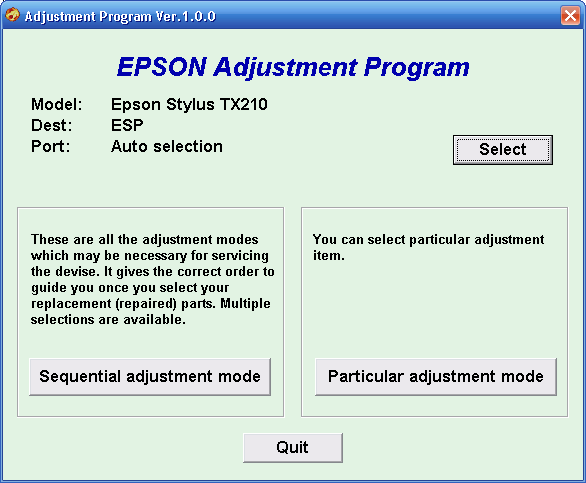
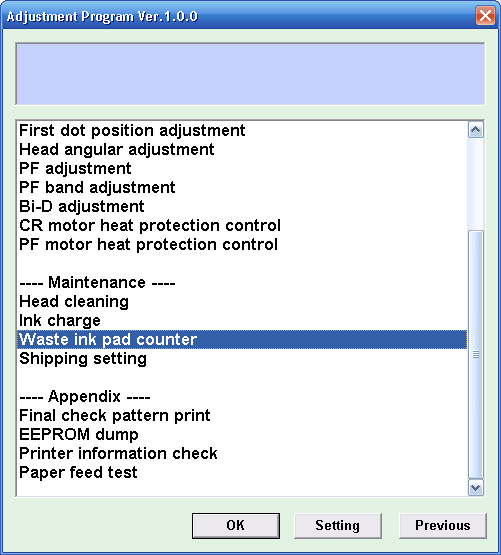
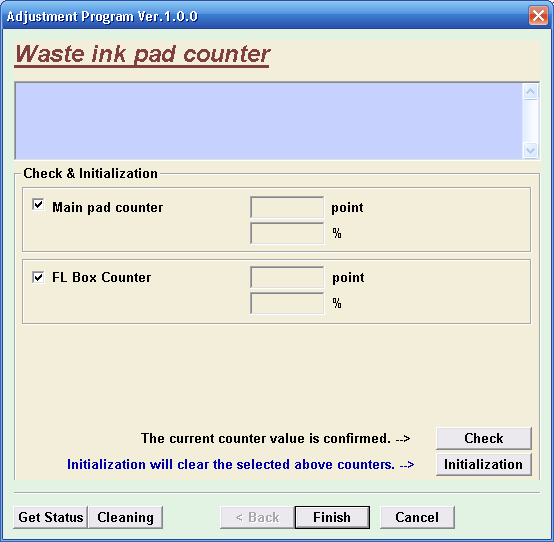
Download Adjustment Program Resetter Epson TX210

     Download Resetter Epson Stylus TX210


adjustment program epson TX210
Reset Counter epson TX210 


                                                  Counter epson TX210
The Epson Stylus TX210 is the all-purpose multifunction printer delivering versatility and easy useability to home users for any task. Featuring four economical individual ink cartridges, high resolution printing, an LCD viewer, memory card slots, etc.
If you need to reset your Epson Stylus TX210, you can download resetter for Epson Stylus TX210.

Download Resetter Epson Stylus TX210:
Resetter Epson Stylus TX210.rar  


Categories:

Related Post:

Jumat, 24 Juni 2011

Printer ini Punya Koneksi WiFi


Produsen printer HP rupanya ingin menanamkan alamat e-mail di nyaris semua printer bisnis maupun konsumer-nya. Maka baru-baru ini diumumkanlah jajaran printer yang terkoneksi ke Web dan Cloud-enabled.

Premium e-All-in-One itu merupakan printer HP yang punya koneksi WiFi dan bisa dikustomisasi melalui jajaran aplikasi cetak HP. Teknologi layar sentuh Touchsmart HP dipakai di layar 10,9cm-nya. O ya, printer ini mendukung cetak bolak-balik tanpa campur tangan manusia (auto-duplexing). HP menjadwalkan kehadirannya pada bulan Oktober mendatang.


HP Photosmart Plus e-All-in-One sepertinya printer yang serupa, tetapi dengan layar sentuh 8,9cm. Yang ini dijadwalkan keluar September mendatang. Selain itu ada HP Photosmart Wireless e-All-in-One dengan layar sentuh yang lebih kecil (6,1cm) dan cartridge tinta individual. Nah, yang ini kabarnya akan muncul Juli mendatang.

Tapi kalau mau yang punya kemampuan fax, nantikan HP Photosmart Premium Fax e-All-in-One dengan document feeder dua-sisi pada September mendatang.

Dengan printer-printer yang mengusung fitur e-mail ini, pengguna bisa mencetak dari sebarang perangkat pintar ke printer tanpa bantuan driver. Output cetak bisa dikirim via pesan e-mail. Mirip PC fax jaman dulu yah?

Tips perawatan Infus sistem untuk printer Epson


Tidak diragukan lagi, penggunaan printer Epson yang telah diinfuss sangat membantu pekerjaan kita yang saabrek. Tidak perlu repot dengan isi ulang (akibat volume inktank yang sedikit), tangan pun gak belepotan dengan tinta.
Yang perlu menjadi perhatian kita adalah cara perawatan printer ini. Penanganan printer yang telah dipasang infuss butuh sedikit tambahan perhatian dibanding yang masih original.
Berikut cara-cara perawatan dan perlakuan printer infuse Epson:
1) Atur posisi tabung tinta sama tinggi alias sejajar dengan printer. Beberapa user mencoba meninggikan tabung tinta dengan tujuan agar tinta bisa mengalir dengan lancer ke inktank. Hal ini tidak dibenarkan, secara otomatis inktank akan menyedot tinta dari tabung jika printer digunakan. Jadi jangan khawatir.
2) Botol pembuangan harus tersambung dengan baik. Jangan lupa periksa ketinggian botol, jika sudah hamper penuh, segera buang isinya dan jangan dipakai lagi.
3) Bawa printer dalam posisi datar, jika membawanya miring akan berakibat tinta di dalam printer akan meluber keluar, casing printer jadi kotor khan...
4) Buka petutup kecil tabung saat printer digunakan, ya … cukup yang kecil aja gak perlu dua-duanya.
5) Jika mau memindahkan posisi printer, semua tutup pada tabung harus terpasang rapat. Dengan bantuan karet atau penjempit, jempitlah selangnya. Buka kembali jika sudah ditempat pada tempat barunya.
6) Segera isi kembali tinta jika ketinggian tinta ¼ dari kapasitas tabung.
7) Isi dengan jenis/merk tinta sejenis / semerk dari tinta sebelumnya, karena tiap-tiap merk berkarakter beda. Kalaupun sangat terpaksa mengganti dengan merk lain, harus dilakukan pengurasan terlebih dahulu.
8) Selama proses pengisian, tutup lubang yang kecil dan buka tutup tabung yang besar. Lakukan pengisian melalui lobang besar saja dengan menggunakan suntikan yang disertakan saat beli tinta.
9) Jika ada tumpahan tinta disekeliling kontainer ataupun catridge pengganti, usap perlahan dengan tisu kering. Jangan sampai tinta tercampur.
10) Jika menemui hasil print yang kurang baik, lakukan perintah head cleaning 1 X saja. Cara melakukan head clean: masuk ke control panel--printers and faxs--klik kanan tipe printer Anda--printing preferences--klik maintenance--pilih head cleaning dan ikuti prosedurnya. Tunggu 5 menit-an dan lakukan test print.

Sering "On-Off" Apa Pengaruh ke Usia Printer?


Nah yang ini adalah tips baru yang tidak sengaja saya jumpai. Ketika kita menyalakan dan mematikan printer, ternyata oleh memori printer juga dicounter. Bisa ditebak, itu akan mempengaruhi usia printer juga lho. Hal ini terjadi pada printer merek Epson dan Canon.
Terkhusus untuk printer Epson sekarang ini, sering menyalakan dan mematikan printer juga berakibat boros pada tinta!! Lho koq bisa?
Anda pernah memperhatikan sesaat setelah printer Epson di-On-kan? Printer akan menyedot tinta pada ink tank total kurang lebih 0,5 cc. Tujuannya agar hasil cetak bisa maksimal, print nozzle-nya bagus. Nah bagaimana kalo hal itu sering dilakukan tentu banyak tinta yang mengalir pembuangan melalui absorber bukan?
Sehingga disarankan tidak sering-sering untuk mematikan dan menyalakan printer. Sehari sekali lah tidak apa. Ato lebih ekstrim lagi ada teman saya di percetakan mengatakan bahwa printernya dinyalakan terus, gak pernah dimatikan -kecuali karena mati listrik tentunya-. Dan hasilnya printernya bisa awet (di samping juga kebersihannya dijaga,jangan sampai berdebu).
Nah, selamat mencoba!